
Cargo Securing Seafastening Workflow
Multi cargo seafastening analysis for professional
SQ-SFA turns the deck cargo securing work into a clear professional workflow: multi-cargo input, automatic stowage views, configurable securing arrangements, directional capacity checks and report-ready calculation output.
SQ-SFA analysis deck
PRO WORKFLOW
Seafastening Case
Cargo InputMulti Cargo
Check EnvelopePer Cargo
Securing ArrangementSingle & Grouped
OutputPDF Report
Core capabilities
Complete seafastening capability in one focused platform
SQ-SFA gives engineers a clean way to build deck cargo cases, configure securing arrangements, visualise stowage and present calculation output with confidence.
Multi-cargo case control
Define multiple cargo units in one case, each with its own dimensions, weight, WCF, CoG, friction condition, deck position and securing setup.
- Independent cargo data
- Integrated case summary
- Cargo-by-cargo calculation output
Automatic 2D stowage output
Generate scaled 2D stowage views automatically, giving users plan, port side and starboard side output for fast arrangement review.
- Top view deck arrangement
- Port side elevation
- Starboard side elevation
Configurable securing arrangements
Set up securing groups to suit the job: lashing systems, stoppers, hold-down behaviour, component capacities and directional assessment.
- Multiple groups per cargo
- Method and angle control
- Weak-link component logic
Directional securing envelope
Review forward, aft, port, starboard and uplift checks in one directional result structure, with clear demand, resistance and UC visibility.
- Sliding utilisation
- Uplift assessment
- Tipping check visibility
Motion and environmental load input
Present vessel motion and environmental components in a structured calculation flow for practical offshore transport engineering assessment.
- Roll / pitch / heave input
- Wind and water inputs
- Load component breakdown
Professional report-ready output
Export a polished report structure covering executive assessment, basis mapping, inputs, stowage visuals, analysis summary and detailed calculations.
- Executive assessment
- Detailed cargo pages
- Review-ready presentation
Analysis engine
From cargo data to securing decision
SQ-SFA keeps the full seafastening workflow connected: case setup, stowage view, securing configuration, directional assessment and final report output.
Choose access planSet up the engineering case in one workspace.
SQ-SFA keeps the workflow clean: cargo geometry, CoG, weight, friction, vessel condition, motion input, environmental input and securing capacity are arranged for direct engineering review.
Review the stowage arrangement visually.
Automatic stowage output helps buyers see exactly what the software does: it turns engineering input into useful plan and side-view arrangement evidence.
Build securing groups around the actual arrangement.
The page emphasises that securing is not one-size-fits-all. Users can set up multiple securing groups, define components and represent different project arrangements with better control.
Issue clear calculation evidence.
The final message is simple: SQ-SFA helps engineers move from raw cargo data to a polished calculation report faster and with stronger presentation quality.
SQ-SFA V3.1 workflow
Updated 3D visual workflow for stowage, grillage and cleat review
SQ-SFA V3.1 adds a more practical visual workflow around Global Isometric review, Cleat Design and 3D grillage/support modelling while keeping the calculation package focused on seafastening, deck support and securing checks.
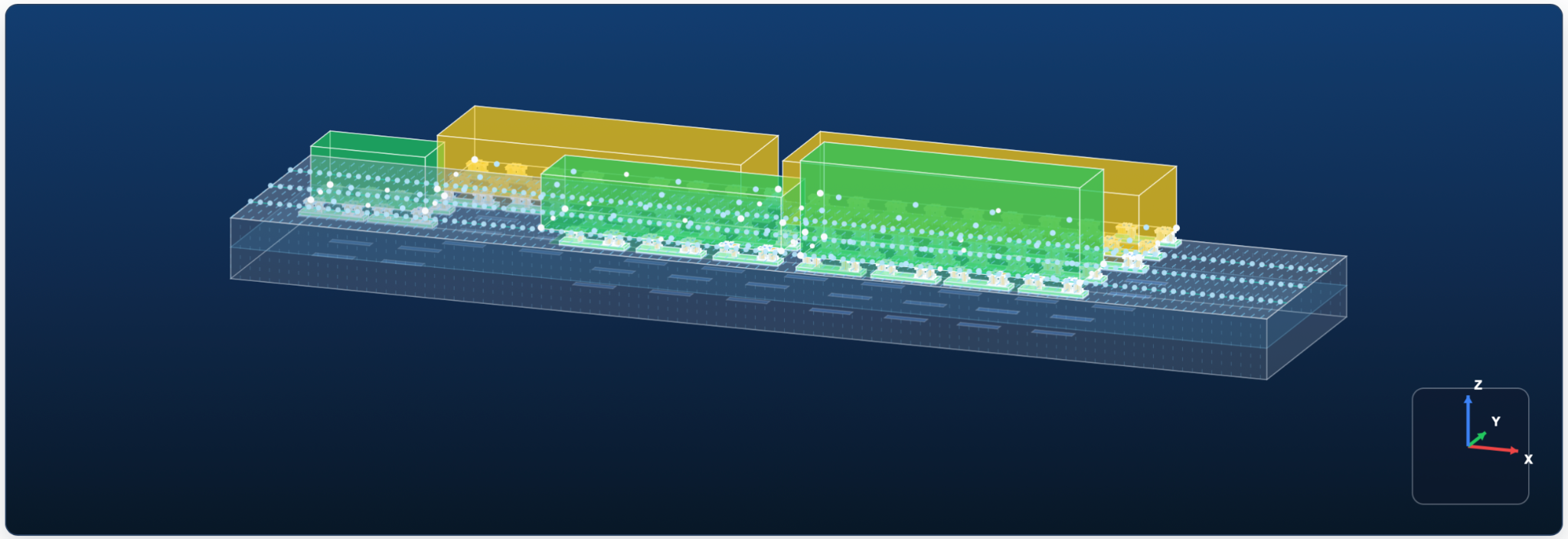
Global Isometric
Review the full cargo, grillage and seafastening arrangement in one 3D scene.
The updated Global Isometric view supports a clearer visual check of cargo placement, support/grillage locations, cleat or seafastening arrangement and colour overlay for engineering review. It helps the user confirm the physical arrangement before issuing calculation output.
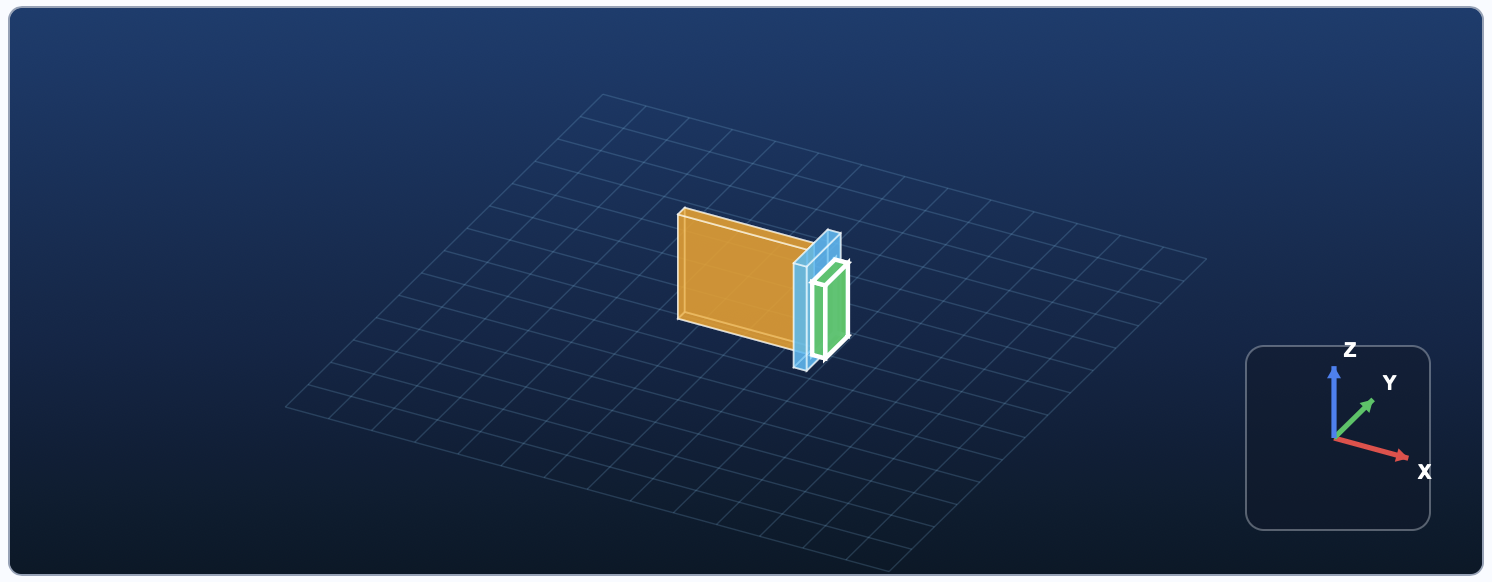
Cleat Design
Build cleat plate assemblies before assigning them to cargo securing.
Users create the required Cleat Design items first, define the cleat geometry, orientation and weld basis, then assign the cleat to the intended cargo/securing arrangement. This keeps the cleat design basis separate from the visual placement workflow.
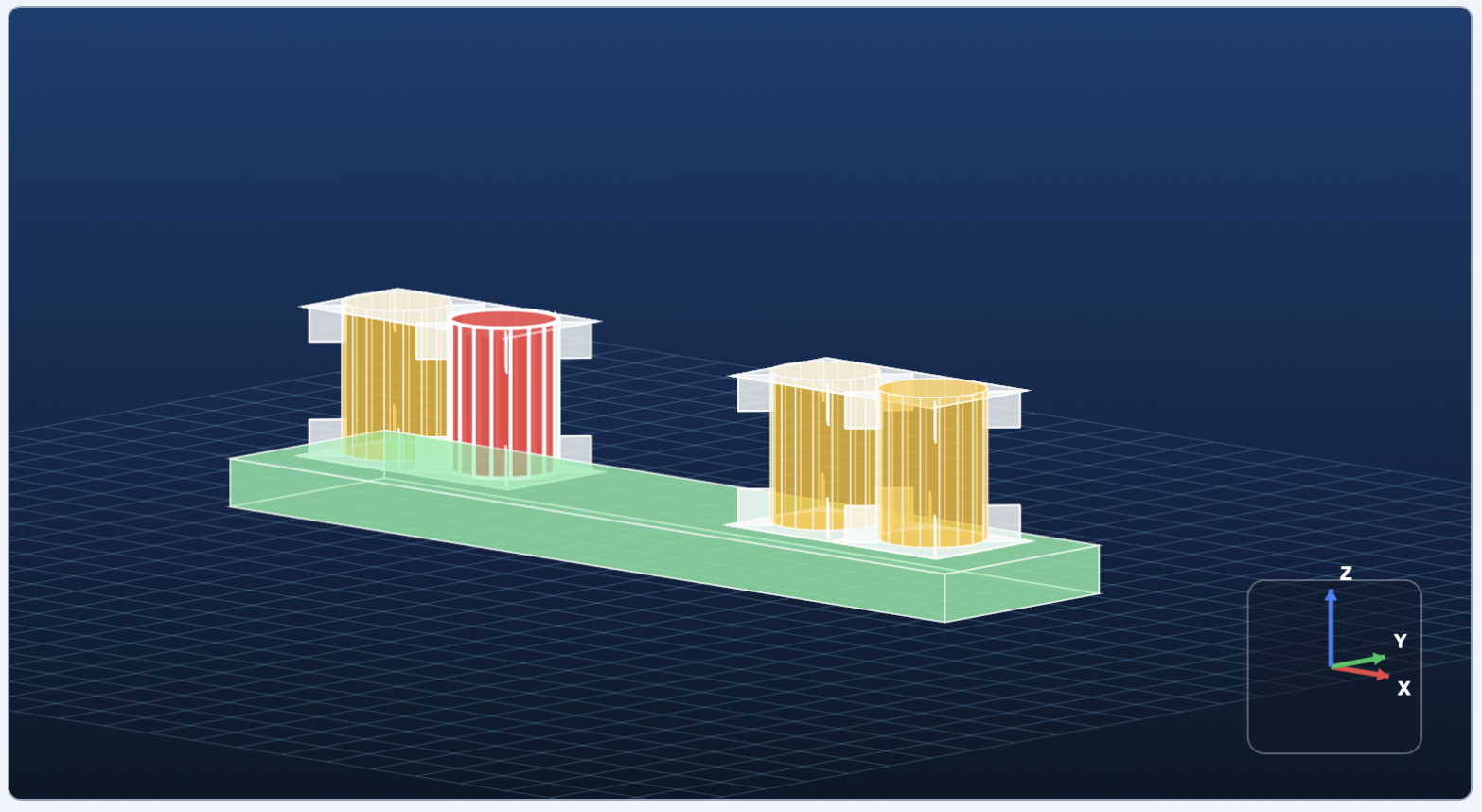
3D Grillage / Support
Use the 3D support model to understand the load-path arrangement.
The 3D grillage/support view gives a consistent visual style for support modelling and arrangement checking. It remains a practical engineering visual and load-path workflow, not a replacement for detailed structural FEM where project approval requires it.
Mandatory cleat workflow:
Create all required Cleat Design items first, determine which cargo each cleat is intended for, go to Global Isometric, arrange each cleat position per cargo, and only use Duplicate after the initial placement has been validated.
Report output samples
SQ-SFA report modules that sell the engineering clearly
The sample section follows the actual SQ-SFA report structure: stability basis, cargo stowage, summary checks, one representative detailed cargo calculation, directional load breakdown and conclusion. Each screenshot is matched to the exact explanation below it.
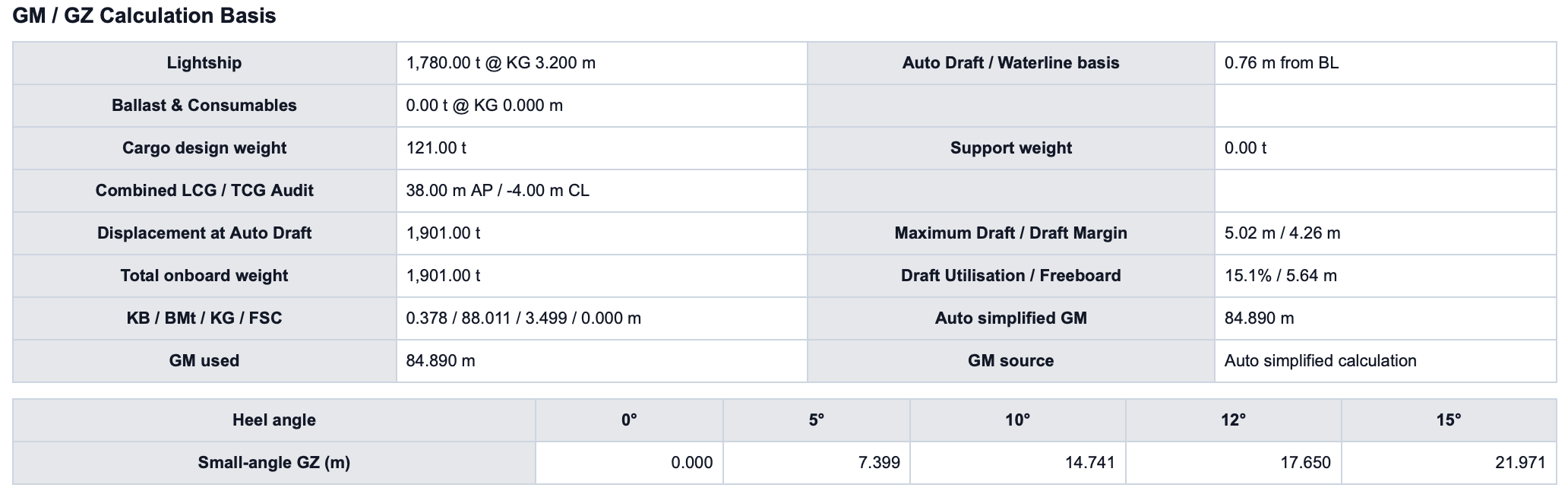
01 · GM / GZ Calculation Basis
Visible stability basis before the securing result is reviewed.
SQ-SFA presents the GM / GZ calculation basis directly in the report so the reviewer can see the stability reference used by the assessment. The module includes lightship, ballast and consumables, cargo design weight, combined LCG / TCG audit, displacement at auto draft, support weight and maximum draft / draft margin.
- Gives the report a transparent stability and draft basis.
- Shows the calculation reference before detailed securing checks.
- Helps reviewers separate software audit basis from formal class stability approval.
02 · Cargo Stowage
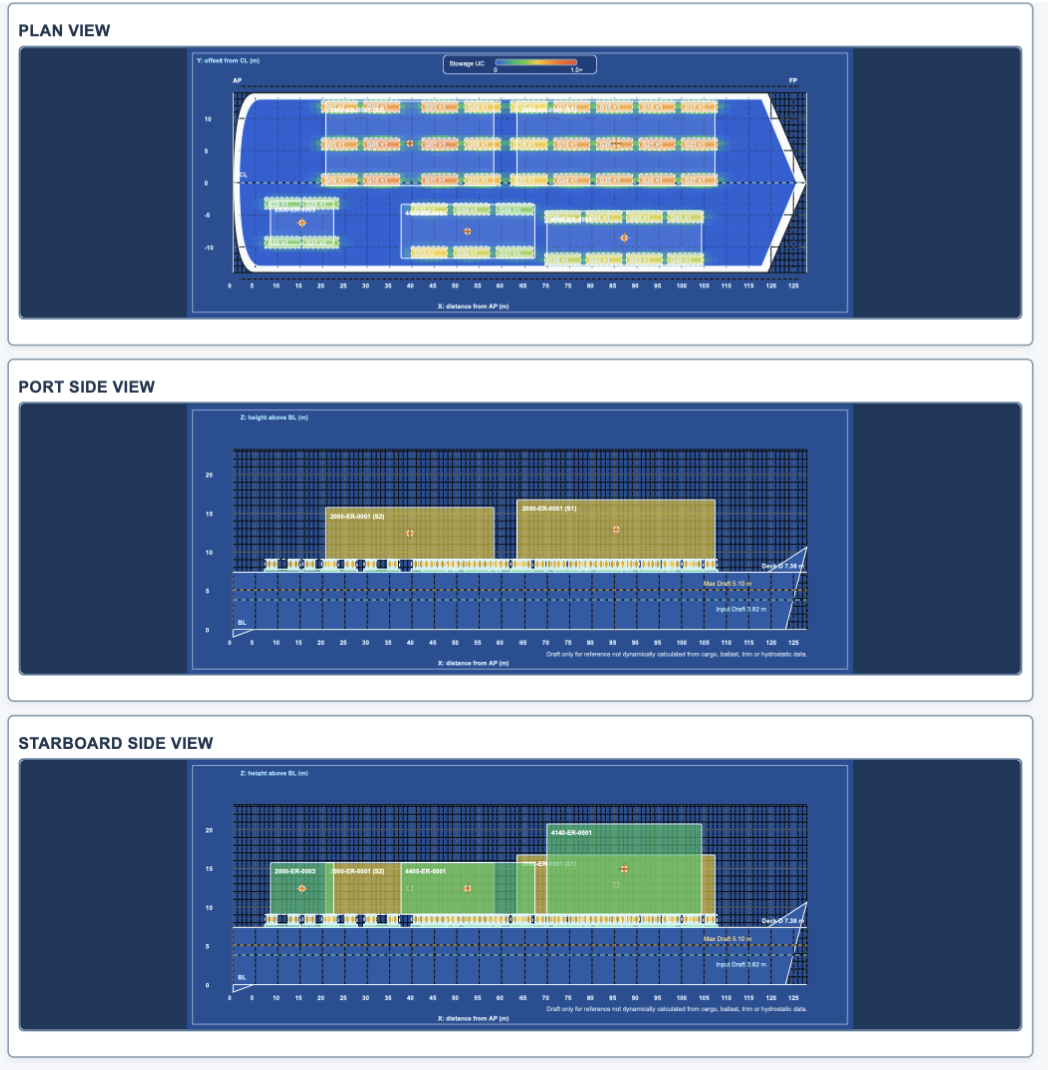
Automatic plan, port side and starboard side stowage views.
The cargo stowage module turns cargo input into visual report output. It shows cargo position against AP, CL and BL references, including plan view, port side view and starboard side view. This helps the user review the deck arrangement visually before checking the calculated securing demand.
- Automatically illustrates cargo position from the entered case data.
- Shows deck line, draft reference and cargo elevation in a clean report view.
- Makes the report easier for client, vessel, yard and project teams to understand.
03 · Analysis Summary
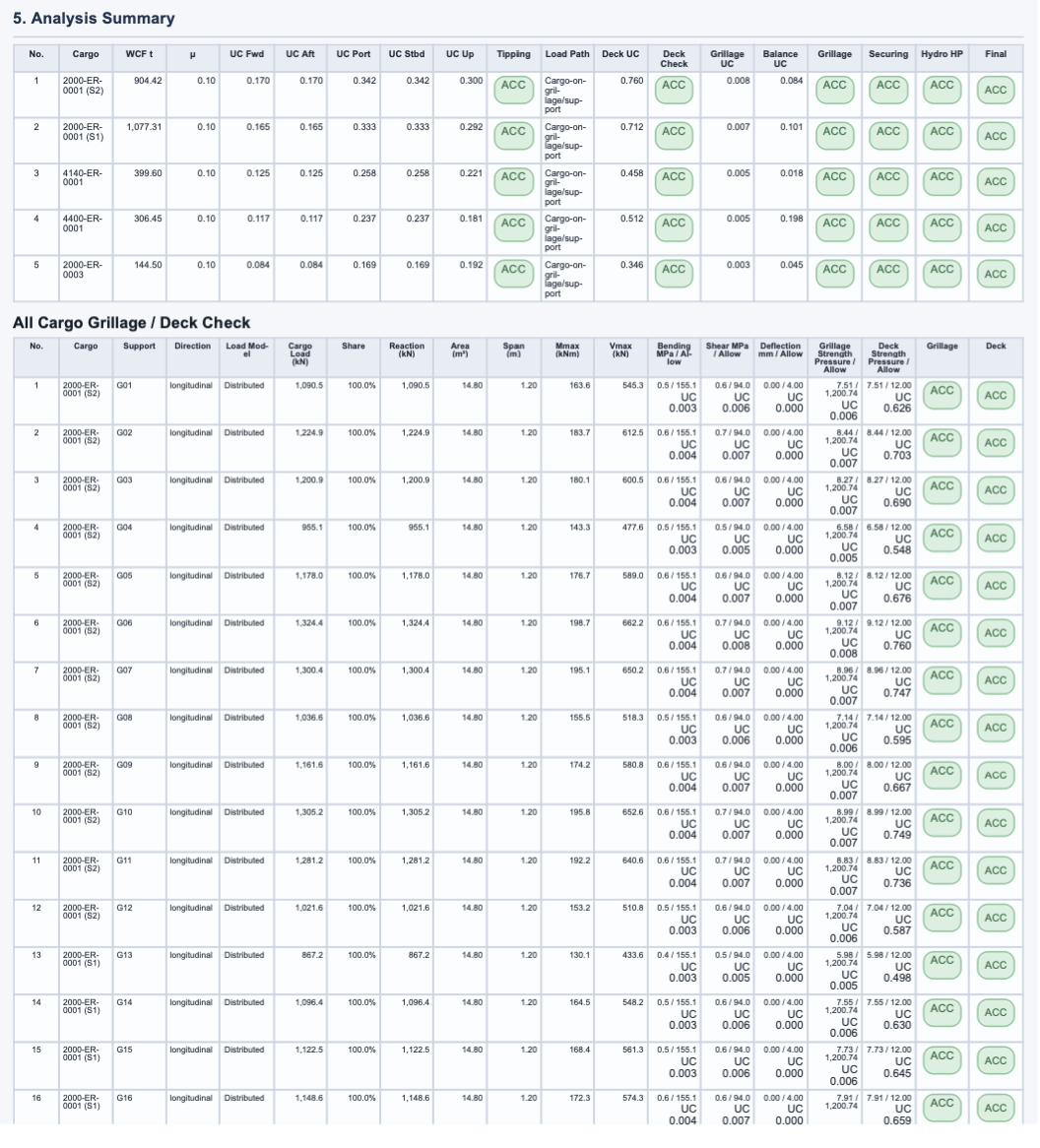
Case-level result table for all assessed cargoes.
The analysis summary gives a compact overview of the full seafastening case. It lists cargo-by-cargo WCF weight, friction coefficient, directional utilisation, tipping status, coverage status and overall result so the governing items can be identified quickly.
- Summarises multiple cargoes in one clear engineering table.
- Highlights utilisation and pass/fail status without searching through pages.
- Supports fast review of whether the arrangement is ready or needs action.
04 · Detailed Calculation per Cargo
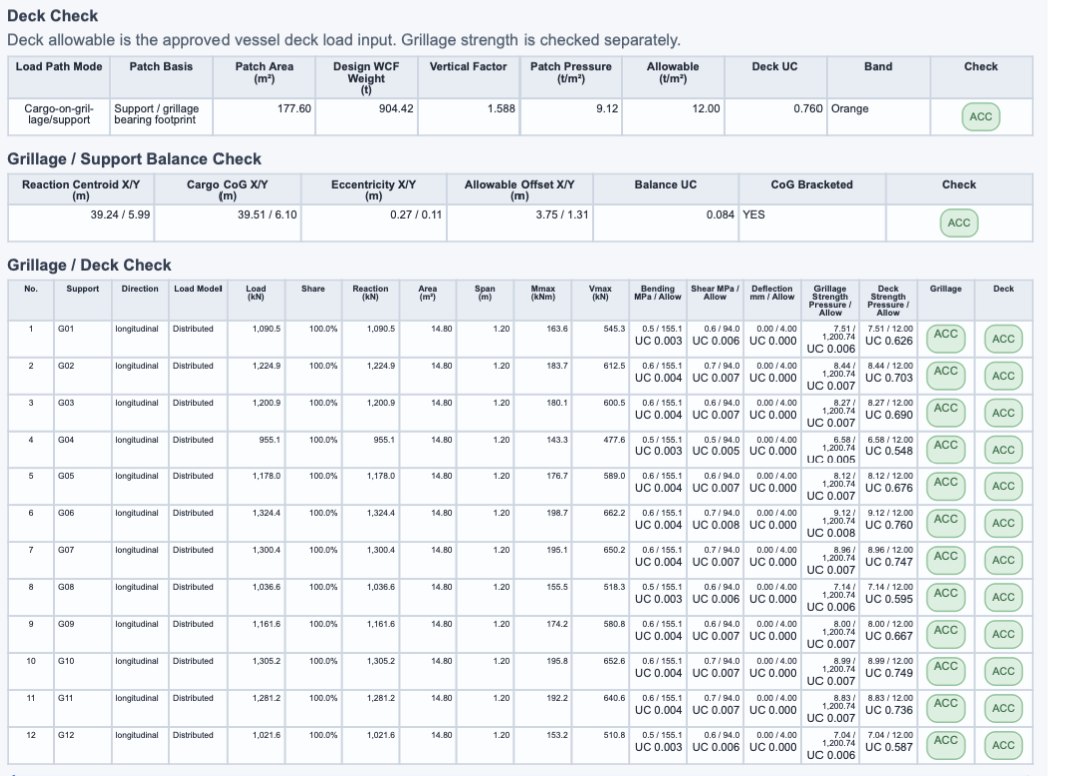
One representative cargo calculation page.
This sample intentionally shows one cargo only. The detailed cargo page presents the core calculation values for a single cargo, including WCF weight, CoG, station location, normal load, friction, motion correction, acceptance UC limit, securing workflow, directional checks and securing capacity output.
- Uses one cargo as a clean representative detailed calculation example.
- Shows the key values behind the cargo-level pass/fail result.
- Gives reviewers a traceable standalone calculation record for each cargo.
05 · Directional Load Breakdown
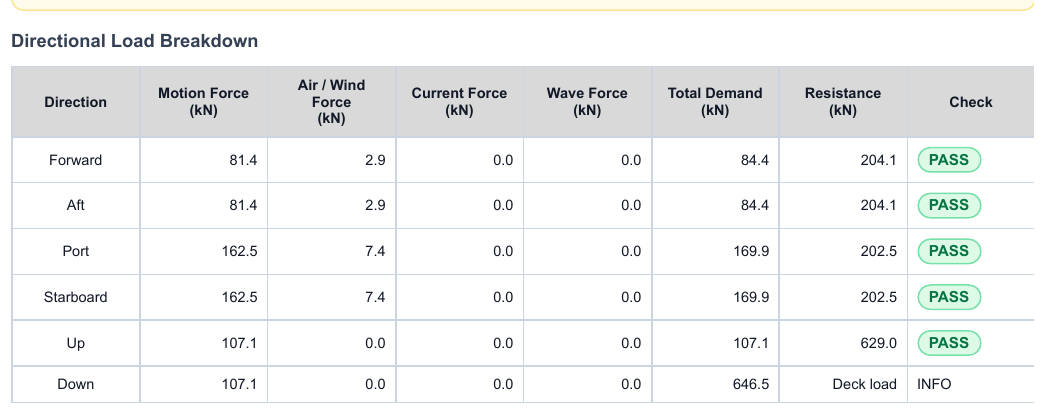
Demand versus resistance shown by direction.
The directional load breakdown shows how the securing check is built up. Forward, aft, port, starboard, up and down directions are presented with motion force, air / wind force, current force, wave force, total demand, resistance and check status.
- Separates force components instead of hiding the result in one number.
- Shows exactly which direction governs the securing assessment.
- Provides a strong technical basis for pass/fail and utilisation review.
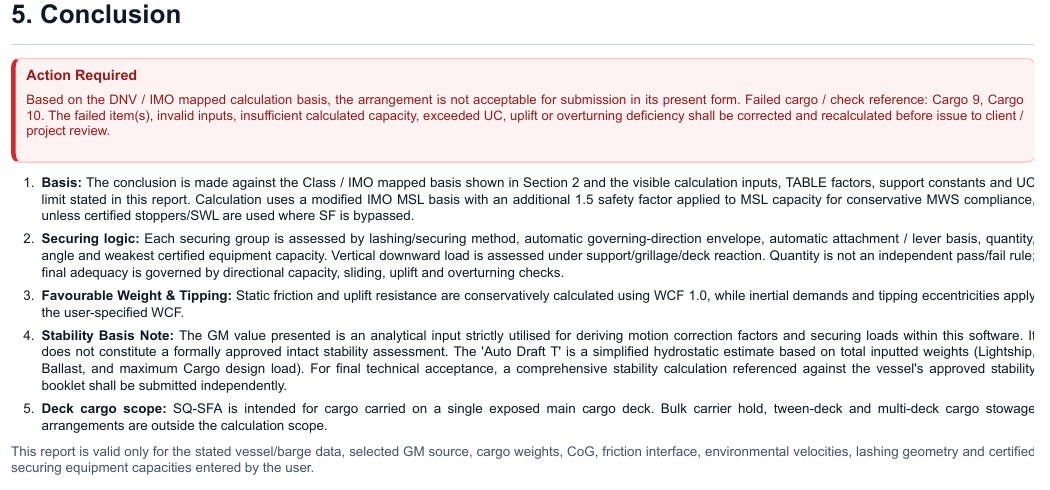
06 · Conclusion
Final assessment statement for the report package.
The conclusion module closes the report with a clear statement of the assessed condition, calculation coverage and result context. It links the calculation output back to the cargo arrangement, accepted basis, governing checks and engineering judgement.
- Turns the calculation package into a readable engineering conclusion.
- Supports client submission with a clear final assessment section.
- Helps project teams understand the result without digging through raw tables.
Access plans
Get your access plan
Select a plan and continue to the secure Payment checkout page. Access details are issued after confirmed purchase through the payment record.
1 Day
USD20.00
For urgent engineering review, proposal support or one focused cargo-securing check.
Get Access1 Week
USD100.00
For short project campaigns, technical comments, layout revisions and securing arrangement development.
Get Access1 Month
USD500.00
For active project execution, multiple cargo cases, calculation updates and report preparation.
Get Access1 Year
USD1500.00
For recurring offshore transport engineering, tenders, internal reviews and regular seafastening assessments.
Get AccessFAQ
Frequently Asked Questions
SQ-SFA is designed to help engineers prepare offshore deck cargo seafastening calculations, manage multi-cargo inputs, configure securing arrangements and produce professional report-style output.
Yes. SQ-SFA supports multi-cargo cases with individual cargo definition and cargo-by-cargo result visibility.
Yes. Users can set up multiple securing groups and configure equipment, quantities, method, direction and angle according to project requirements.
Yes. The software generates automatic 2D stowage visuals, including plan view, port side view and starboard side view.
The buyer selects a plan and continues to the secure PayPal checkout page. Access details are issued after confirmed purchase through the PayPal payment record.
EULA
Licence terms
1. Licence access
SQ-SFA access is issued to the registered licence holder or purchasing organisation for the selected access period.
2. Access period
The available plans are 1 day, 1 week, 1 month and 1 year. Access begins from activation unless confirmed otherwise in writing.
3. Permitted use
The licensed user may enter engineering data, run calculations, save or load case files and generate output for legitimate project and commercial engineering work.
4. Access control
Licence credentials, access links and activation tokens are issued to the registered access record and are intended for authorised use only.
5. Intellectual property
The SQ-SFA interface, brand, scripts, report format, workflow structure and related resources remain the property of the software owner.
6. Commercial restriction
The software, activation resources and payment flow shall not be resold, re-hosted, redistributed or reverse engineered without written permission.
7. No refund after buy
All SQ-SFA digital access purchases are final. NO REFUND AFTER BUY. The buyer is responsible for selecting the correct access period before completing payment.
8. Payment verification
PayPal transaction details may be used to verify purchase, issue access and support licence management.
Start producing sharper seafastening analysis with SQ-SFA.
Use one focused platform for multi-cargo, automatic stowage views, configurable securing arrangements and professional report output.
Get Access Now